Fibre-optic cabling: How much loss is ok?
By Dan Barrera, Director of Product Innovation, TREND Networks
At TREND Networks, we are frequently asked how much loss is allowed when conducting testing on fibre optic cabling. Unfortunately, it is not a simple answer and depends on several factors. So how do you determine acceptable loss?
Fibre Optic Loss Considerations
When testing fibre optic cabling, determining acceptable loss is crucial. This depends on various factors, including who is conducting the test and the phase of the project. Contractors often install, terminate, and certify cabling without knowing the client’s specific requirements. Therefore, unless the client provides specifications for acceptable attenuation (insertion loss), the installer must calculate the correct value based on the specifics of each link.
Standards and Specifications
If the installer knows what application (i.e. Ethernet speed) the client plans to run on the system, they can refer to standards for that application to determine acceptable loss. The make and model of network equipment also play a role in setting loss limits based on specific applications, typically variations of Ethernet. Loss budget calculations are essential, using specifications of the actual networking equipment operating on the installed cabling.
Cabling-based loss budgets
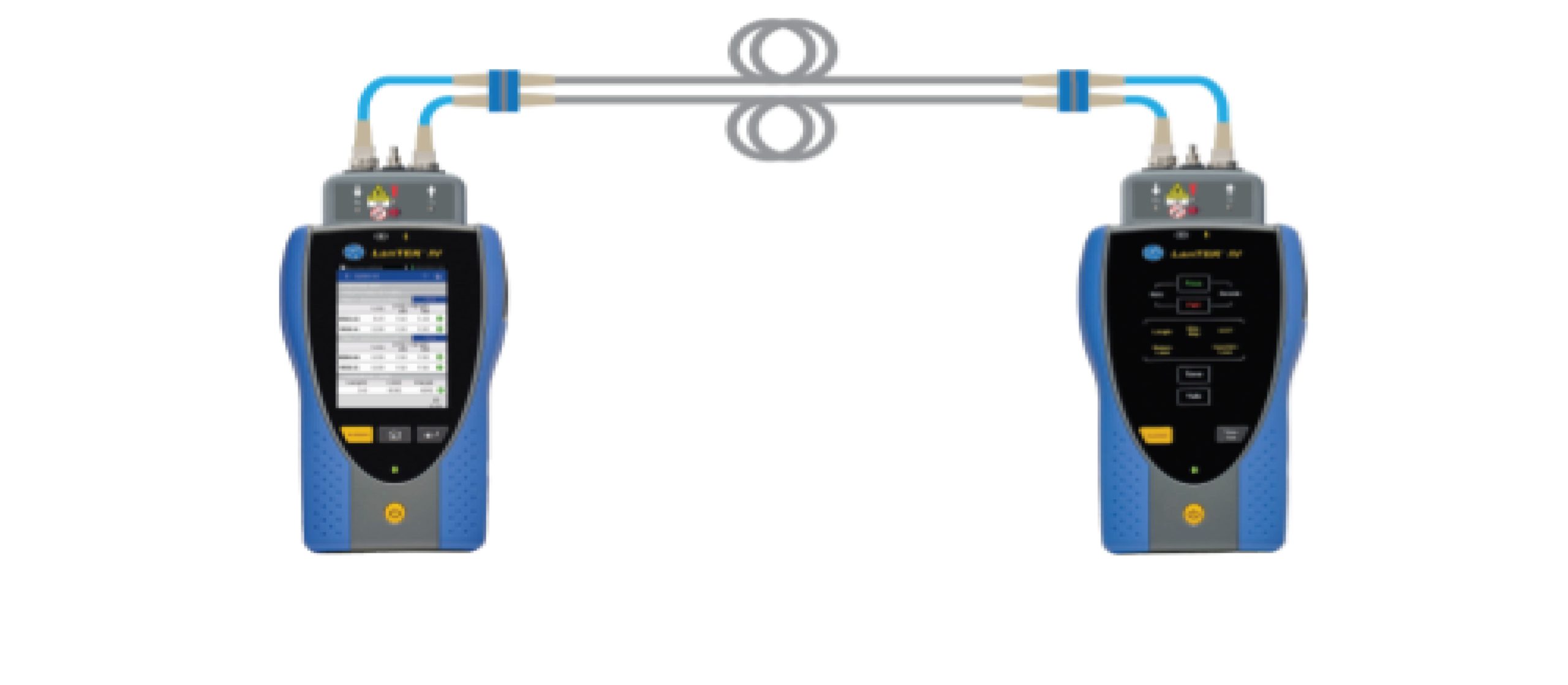
This is a popular method for determining the acceptable loss for certification of the cabling following installation. Using an optical power meter and light source or OLTS (Optical Loss Test Set), Tier 1 Certification can be performed against industry standard limits for cable and connectors. Both the TIA and ISO cabling standards list the acceptable loss limits for fibre optic components, and these values are used to calculate a loss budget.
The TIA-568.3-E (2022) standard lists the following transmission performance parameters for optical fibre:
| Fiber Type | Wavelength (nm) | Max Cable Attenuation (dB/km) | Min Multimode Overfilled Bandwidth-length product (MHz•km) | Min Multimode Overfilled Bandwidth-length product (MHz•km) |
| OM3 Multimode | 850 953 1300 | 3.0 Not specified 1.5 | 1500 Not specified 500 | 2000 Not specified Not required |
| OM4 Multimode | 850 953 1300 | 3.0 Not specified 1.5 | 3500 Not specified 500 | 4700 Not specified Not required |
| OM5 Multimode | 850 953 1300 | 3.0 2.3 1.5 | 3500 1850 500 | 4700 2470 Not required |
| Indoor/Outdoor Single-mode | 1310 1383 1550 | 0.5 0.5 0.5 | N/A N/A N/A | N/A N/A N/A |
| OS1a Inside Plant Single-mode | 1310 1383 1550 | 1.0 1.0 1.0 | N/A N/A N/A | N/A N/A N/A |
| OS2 Outside Plant Single-mode | 1310 1383 1550 | 0.4 0.4 0.4 | N/A N/A N/A | N/A N/A N/A |
| Connector/Splice | Maximum Insertion Loss |
| Standard-to-standard grade connector | 0.75 dB |
| Reference-to-standard grade connector | 0.50 dB |
| Fusion or mechanical splice | 0.30 dB |
To make the process easier, some testers like the LanTEK IV-S with FiberTEK IV-S modules from TREND Networks have built-in loss budget calculators so you can enter the variables and automatically determine the loss limit.
Loss Budget Calculation Examples
Take an example of a simple 90-metre horizontal multimode cable link with a patch panel at one side and a work area outlet at the other.
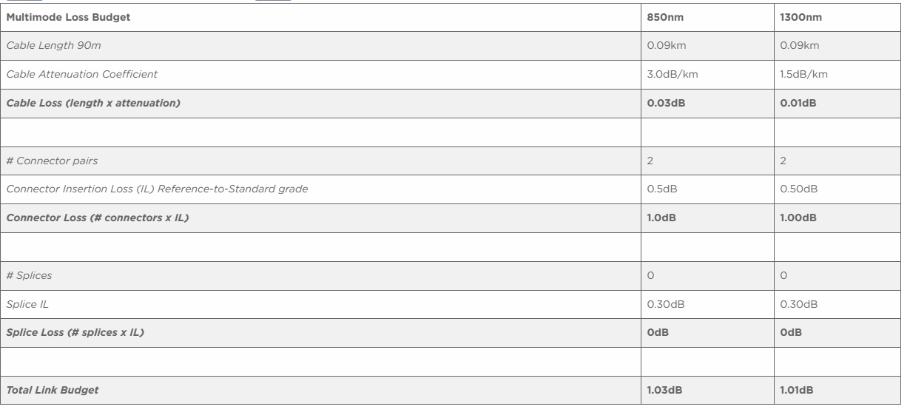
Using the same concept, lets calculate the budget for a 1,500-metre multimode link with 2 splices and a connection at each end.


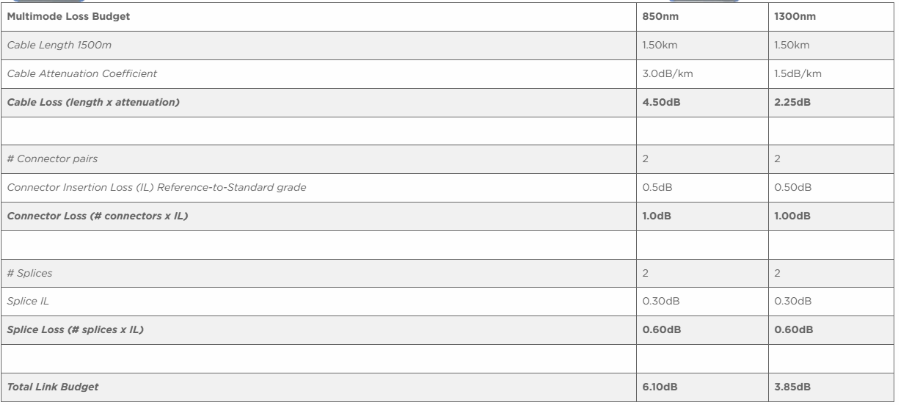
The previous calculations tell the installer what the pass/fail limit in the tester needs to be set to to certify each of the links to TIA/ISO cabling standards. In this case, the measured insertion loss needs to be less than 6.10dB at 850nm and 3.85dB at 1300nm for the link to pass.
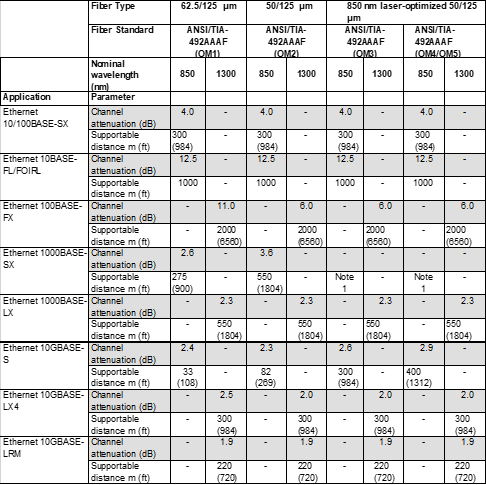
Keep in mind that this calculation is for the cabling only. It does not consider the communication application that will be running over the link. Some applications in the table below will not operate over this link because it exceeds both the length and insertion loss allowances.
For example, 10GBase-LX4 (10G Ethernet at 1300nm) allows a maximum loss of 2.0dB and a maximum distance of 300 metres (yellow highlight). A 1,500-metre link with up to 3.85dB of insertion loss exceeds both the insertion loss and length limits of 10GBase-LX4.
100Base-FX (100Mb Ethernet at 1300nm) highlighted in green allows a maximum insertion loss of 6.0dB and a maximum length of 2,000 metres. The example link will support 100Mb Ethernet if the test passes the limits determined by the loss budget calculation.
Using application specific limits
It is easiest to set a loss budget when you know the application the fibre will support. You can then check the requirements for each application.
Below is an excerpt from the TIA-TSB-6000 document that lists requirements for a few common Ethernet applications.
| Fiber Type | 62.5/125 μm | 50/125 μm | 850 nm laser-optimized 50/125 μm | ||||||
| Fiber Standard | ANSI/TIA- 492AAAF (OM1) | ANSI/TIA- 492AAAF (OM2) | ANSI/TIA- 492AAAF (OM3) | ANSI/TIA- 492AAAF (OM4/OM5) | |||||
| Nominal wavelength (nm) | 850 | 130 0 | 850 | 1300 | 850 | 1300 | 850 | 1300 | |
| Application | Parameter | ||||||||
| Ethernet 25GBASE-SR | Channel attenuation (dB) | – | – | – | – | 1.8 | – | 1.9 | – |
| Supportable distance m (ft) | – | – | – | – | 70 (230) | – | 100 (328) | – | |
| Ethernet 40GBASE-SR4 | Channel attenuation (dB) | – | – | – | – | 1.9 | – | 1.5 2 | – |
| Supportable distance m (ft) | – | – | – | – | 100 (328) | – | 150 (492) | – | |
| Ethernet 50GBASE-SR | Channel attenuation (dB) | – | – | – | – | 1.8 | – | 1.9 | – |
| Supportable distance m (ft) | – | – | – | – | 70 (230) | – | 100 (328) | – | |
| Ethernet 100GBASE-SR4 | Channel attenuation (dB) | – | – | – | – | 1.8 | – | 1.9 | – |
| Supportable distance m (ft) | – | – | – | – | 70 (230) | – | 100 (328) | – | |
| Ethernet 100GBASE-SR10 | Channel attenuation (dB) | – | – | – | – | 1.9 | – | 1.5 2 | – |
| Supportable distance m (ft) | – | – | – | – | 100 (328) | – | 150 (492) | – | |
| Ethernet 100GBASE-SR2 | Channel attenuation (dB) | – | – | – | – | 1.8 | – | 1.9 | – |
| Supportable distance m (ft) | – | – | – | – | 70 (230) | – | 100 (328) | – | |
| Ethernet 100GBASE-VR1 | Channel attenuation (dB) | – | – | – | – | 1.6 | – | 1.7 | – |
| Supportable distance m (ft) | – | – | – | – | 30 (98) | – | 50 (164) | – | |
| Ethernet 100GBASE-SR1 | Channel attenuation (dB) | – | – | – | – | 1.7 | – | 1.8 | – |
| Supportable distance m (ft) | – | – | – | – | 60 (196) | – | 100 (328) | – | |
| Ethernet 200GBASE-SR4 | Channel attenuation (dB) | – | – | – | – | 1.8 | – | 1.9 | – |
| Supportable distance m (ft) | – | – | – | – | 70 (230) | – | 100 (328) | – | |
| Ethernet 200GBASE-VR2 | Channel attenuation (dB) | – | – | – | – | 1.6 | – | 1.7 | – |
| Supportable distance m (ft) | – | – | – | – | 30 (98) | – | 50 (164) | – | |
| Ethernet 200GBASE-SR2 | Channel attenuation (dB) | – | – | – | – | 1.7 | – | 1.8 | – |
| Supportable distance m (ft) | – | – | – | – | 60 (196) | – | 100 (328) | – | |
| Ethernet 400GBASE-VR4 | Channel attenuation (dB) | – | – | – | – | 1.6 | – | 1.7 | – |
| Supportable distance m (ft) | – | – | – | – | 30 (98) | – | 50 (164) | – | |
| Ethernet 400GBASE-SR4 | Channel attenuation (dB) | – | – | – | – | 1.7 | – | 1.8 | – |
| Supportable distance m (ft) | – | – | – | – | 60 (196) | – | 100 (328) | – | |
These charts make easy work of determining loss budgets if the application that will be running over the fibre is known. Plus, some fibre certifiers incorporate a database with these values, so you can simply choose the appropriate standard, and the pass/fail limits are set automatically.
Calculating loss budgets for networking equipment
When the networking equipment that will be running over the fibre is known, the requirements of that can be used to determine the loss budget.
Each piece of optical networking equipment, even SFP/GBIC modules will have specifications for output power and receiver sensitivity. These tell the user exactly how much loss the equipment can sustain and still operate properly.
Transmitter output specifies how “bright” the light is that is emitted from the transmitter port. The specification will be in dBm (not dB). A typical device may have an output power of -20dBm.
Don’t let the negative confuse you, it doesn’t mean negative power. 0dBm is a reference to 1mW (milliwatt) of power, and a negative dBm value simply means less than 1mW.
Note: dBm is an amount of power. dB is a change in power from one level to another.
A receiver usually has two specifications: Receiver Sensitivity and Dynamic Range.
Receiver Sensitivity is the weakest (darkest) signal the receiver can detect and the Dynamic Range is how much brighter than the Sensitivity specification the light can be without blinding the receiver. For example, a receiver with a Sensitivity of -30dBm and a Dynamic Range of 20dB can detect light within a range of -10 to -30dBm.
The diagram below should help visualise the scenario:
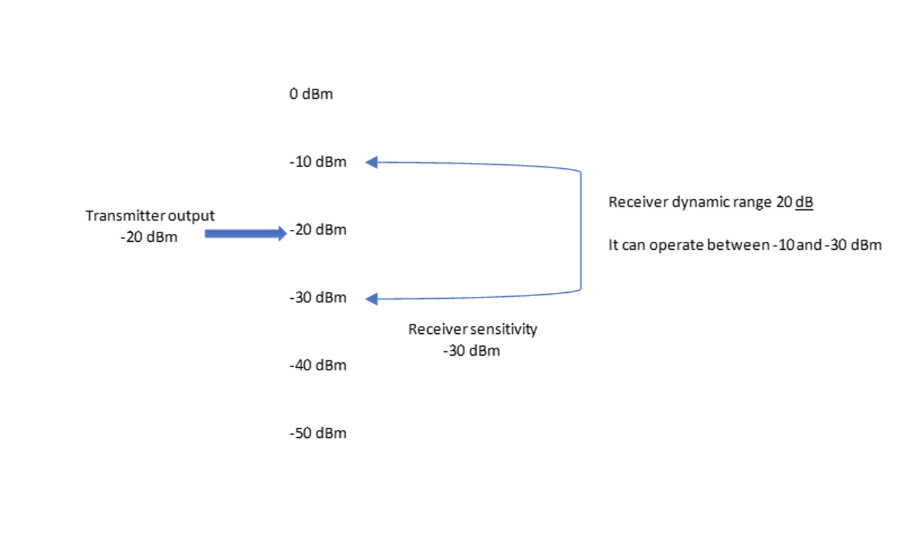
If the transmitter injects light into the fibre at -20dBm, and the weakest light the receiver can detect is -30dBm, the difference between the two is 10dB. This means that the system can have at most 10dB of loss before the signal is too weak for the receiver to detect.
What if the receiver was paired with a transmitter that output -5dBm of power? The signal would be too strong and overpower the receiver. With optical systems, care must be taken to not overdrive receivers because it will be just as detrimental as having too little signal.
For more information on determining acceptable loss and testers for fibre optic cabling, get in touch.
Frequently Asked Questions
Q: What is fibre optic loss?
A: Fibre optic loss refers to the reduction in signal strength as it travels through the fibre optic cable. This can be due to various factors, including attenuation, connectors, and splices.
Q: How is fibre optic loss measured?
A: Fibre optic loss is typically measured using an Optical Loss Test Set (OLTS) or an optical power meter and light source.
Q: What are the acceptable loss limits for fibre optic cabling?
A: Acceptable loss limits vary based on the type of fibre optic cable and the standards set by organizations like TIA and ISO. For example, the TIA-568.3-D standard lists specific limits for multimode and single-mode fibres.
Q: What is a good fibre dB reading?
A: A good fibre dB reading indicates minimal loss. For multimode fibre, a reading of less than 3.0 dB/km at 850nm is considered good. For single-mode fibre, a reading of less than 0.5 dB/km at 1310nm or 1550nm is ideal.
Q: Why is loss budget calculation important?
A: Loss budget calculation is crucial for ensuring that the installed fibre optic cabling meets the required performance standards and can support the intended network applications.
Q: What tools can help with loss budget calculations?
A: Tools like the LanTEK IV-S with FiberTEK IV-S modules from TREND Networks have built-in loss budget calculators that simplify the process.
Q: How to fix fibre optic link fail?
A: To fix a fibre optic link fail, you can check for physical damage, clean the connectors, ensure proper splicing, and verify the loss budget. Using an OTDR (Optical Time-Domain Reflectometer) like the TREND FiberMASTER can help identify the exact location of the fault.